 admin
adminWhy LiDAR Annotation Is Broken — And How JTheta Fixes It
“A self-driving car doesn’t see with its eyes — it sees with data. And when that data is mislabeled, perception collapses.”
In the world of autonomous vehicles (AVs) and advanced driver-assistance systems (ADAS), LiDAR isn’t just another sensor — it’s the foundation of 3D perception.
Yet, labeling LiDAR data remains one of the hardest, slowest, and most error-prone tasks in the AI pipeline.
At JTheta.ai, we set out to fix that.
The Problem: Why LiDAR Annotation Is Broken
LiDAR (Light Detection and Ranging) captures the world in 3D point clouds — millions of points per frame.
Unlike 2D images, these datasets contain depth, distance, and geometry, giving machines a true spatial understanding.
But labeling this data accurately is far from simple.
The challenges stack up quickly:
- Manual labeling across dense 3D scenes takes hours per frame.
- Slow interfaces choke on large point clouds.
- Bounding box tools lack true 3D context.
- Messy exports break downstream training pipelines.
- Annotation drift (across frames) kills model accuracy.
In short — annotation inefficiency is holding back AV progress.
The Modality: Understanding 3D Point Clouds
LiDAR data is fundamentally different from image or video data:
- 3D Cuboids instead of 2D boxes: Each labeled object must fit precisely in three axes (X, Y, Z).
- Temporal consistency: Vehicles, pedestrians, and objects move — labels must track them across time.
- Sensor fusion alignment: LiDAR must synchronize with camera, radar, or GPS data.
- Massive file sizes: Point cloud frames can reach hundreds of MBs, demanding high-performance infrastructure.
That’s why annotation tools built for 2D imagery fail here — they lack spatial intelligence and scalability.
How JTheta.ai Fixes It
At JTheta.ai, we built a LiDAR-first annotation platform that blends human precision with AI speed — purpose-built for mobility and perception teams.
Here’s how:
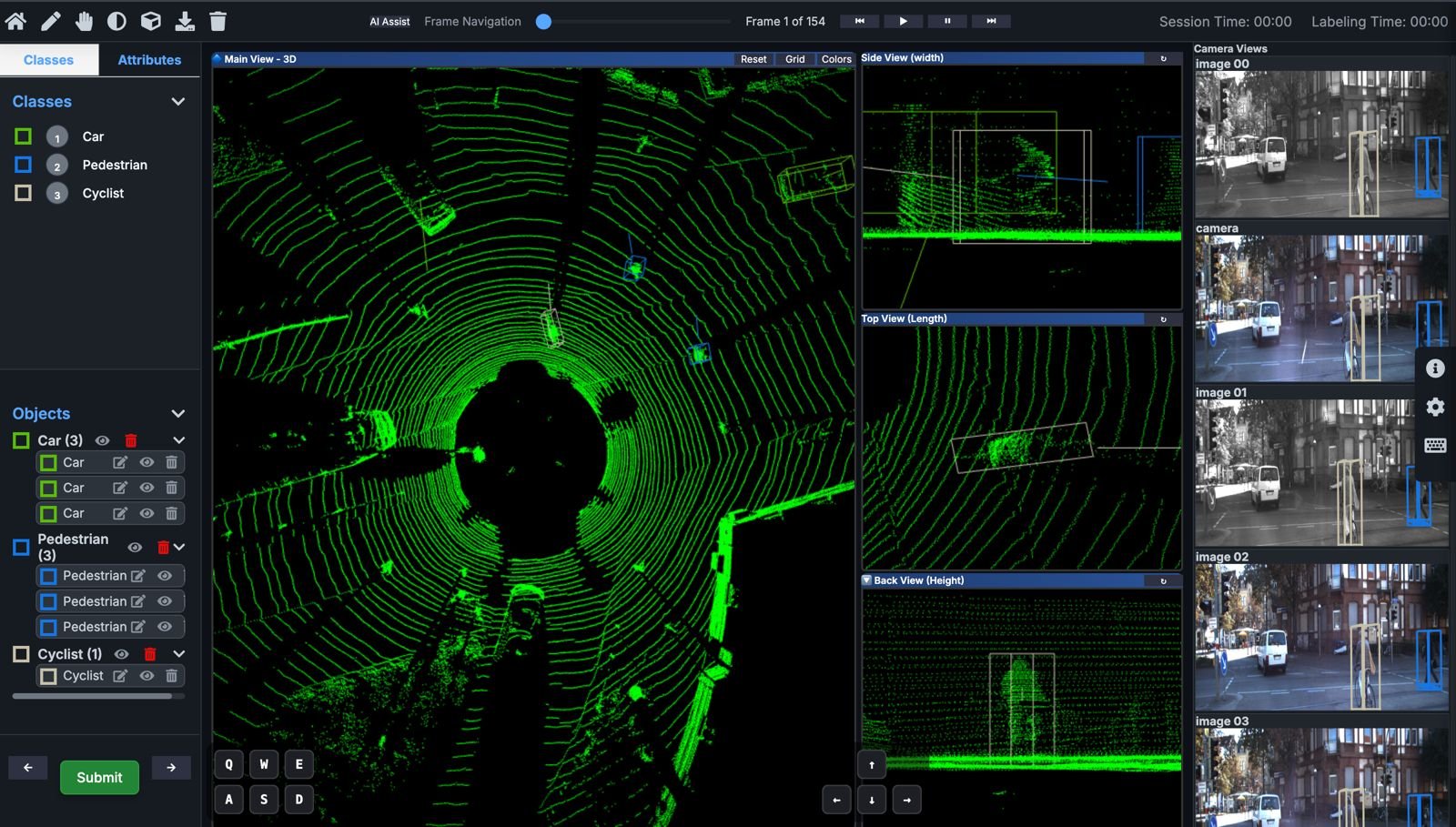
🧩 1. 3D Cuboid Annotation
Draw, rotate, and align 3D cuboids seamlessly inside dense point clouds.
Our intuitive 3D editor supports multi-view perspective and precise depth alignment — letting annotators label faster without compromising accuracy.
⚡ 2. Interpolation & Frame Linking
No need to label every frame manually.
JTheta.ai’s interpolation engine automatically propagates annotations across sequences, maintaining identity consistency and saving up to 60–70% labeling time.
🤖 3. AI-Assist & Auto-Labeling
Built-in AI-Assist predicts objects, shapes, and trajectories before humans intervene.Annotators validate or refine — not start from scratch.
This human-in-the-loop approach improves both speed and dataset quality.
☁️ 4. Scalable Cloud Infrastructure
Our cloud-native platform is optimized for massive LiDAR datasets — from city-scale AV recordings to robotics perception logs.
Teams can collaborate, review, and manage projects in real time with version control and automated QA checks.
🔄 5. Seamless Export & Integration
Export your annotations in industry-standard formats —
COCO, KITTI, or custom LiDAR-compatible schemas — directly into ML pipelines.
No broken metadata. No reformatting headaches.
🧭 The Result: Speed Meets Accuracy
By combining AI-assisted labeling, 3D-native design, and scalable performance, JTheta.ai helps ADAS and AV teams:
- Reduce annotation time by up to 70%
- Improve consistency and accuracy across frames
- Build richer datasets for object detection, motion prediction, and segmentation
Whether it’s detecting a pedestrian at night or mapping a city block in motion — JTheta.ai ensures your LiDAR perception data is clean, fast, and future-ready.
Why It Matters
Every autonomous vehicle depends on a model that truly understands the 3D world.
But that model is only as good as the data it learns from.
By fixing LiDAR annotation, we’re not just accelerating labeling — we’re accelerating the future of mobility. (Add images/video)
🧭 Try JTheta.ai LiDAR MVP → www.jtheta.ai/lidar-mvp